BBEdit and App Sandboxing
[Note: The information in this article refers to BBEdit 12.6 and later, including BBEdit 13 and 14.]
“App Sandboxing” is a term that refers to a collection of security technologies built in to macOS. Sandboxing is intended to protect you and your data by limiting the operation of applications to their intended use, which in turn makes it harder for malicious software or accidental misuse to cause data loss or damage to your computer.
One of the core concepts of App Sandboxing is that BBEdit, as a sandboxed application, is not allowed to use any of your files or folders without your explicit permission. You can grant this permission in one of a small number of ways, including (but not necessarily limited to):
- Asking BBEdit to open a file from the Finder by double-clicking it;
- Dragging a file from the Finder on to BBEdit’s application icon;
- Using BBEdit’s “Open…” command to choose a file or folder.
However, as an advanced developer tool, BBEdit frequently requires access to files or folders that that you may not have specifically asked it to open, for safe and legitimate reasons:
- If you have located BBEdit’s application support folder in Dropbox or iCloud Drive, BBEdit needs to be able to figure out where the folder actually is, and be able to use that location;
- When opening a document, BBEdit needs to know:
- whether the file is under revision control with Git or Subversion;
- whether there are one or more `.editorconfig` files which control editor options for the file;
- whether any `ctags` data is available to support BBEdit’s completion and “Find Definition” features;
- When previewing a file with unsaved changes, BBEdit needs to be able to write a temporary file out in the same directory, so that relative links within the file remain correct;
- If you have turned on “Make Backups” in the Text Files preferences, BBEdit needs to be able to write backup and auto-recovery files in the same directory as the file being saved;
- The “Open File by Name” feature needs to be able to examine all possible directories that may contain files for which you’re searching, including some that you may never have used before in BBEdit;
- Many dialog boxes in BBEdit which allow you to choose a file or folder give you the choice of directly entering a file path;
…and many more similar cases.
In addition, the macOS security system imposes additional restrictions when you edit an executable file, such as a shell script, or any script file that begins with a `#!` line and has execute permissions.
Without unrestricted access to your files and folders, many of BBEdit’s most useful features, from the basic to the most powerful, won’t work at all; or they may misbehave in unexpected ways. At the very least, this hinders your ability to work done.
In order to resolve this fundamental conflict between security and usability, we have devised a solution in which BBEdit requests that you permit it the same sort of access to your files and folders that was previously available to non-sandboxed versions of BBEdit or TextWrangler.
This in no way compromises your security or that of your computer while using BBEdit, but does allow BBEdit to function at its fullest potential.
If you have been using a previous non-sandboxed version, your existing settings and support folder contents are unaffected by this change.
Granting Access
To give BBEdit the access that it needs, open BBEdit’s Preferences window and select the “Application” item in the side bar. You should see something that looks like this:
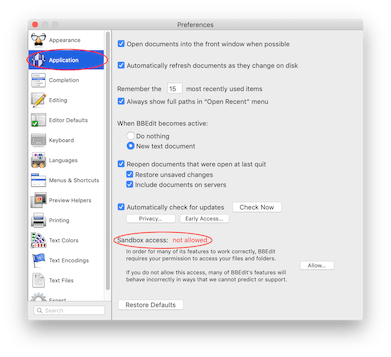
Click the “Allow…” button to confirm access to the top directory of your startup disk.
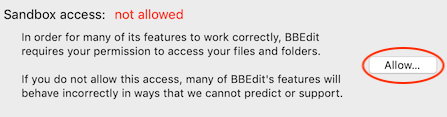
And you’re done!
What about “Full Disk Access”?
macOS Mojave and later support a feature called “Full Disk Access”. Adding an application to the Full Disk Access
list instructs the OS to permit that application to read and write files that reside in certain protected locations.
However,
Full Disk Access has no interaction with App Sandboxing. Thus, adding BBEdit to the
Full Disk Access list will not affect BBEdit’s sandboxed behavior.
Conversely, granting BBEdit sandbox access as described above will not add it to the Full Disk Access list – the OS requires that you do so yourself, if desired.
Would you like to know more?
If you would like to read about the technical aspects of sandboxing in depth, we recommend that you consult Apple’s developer documentation.