Yojimbo Product Tour
Tour Start | Using Collections | Using the toolbar | Searching for items | Encrypting Sensitive Data | Using the Inspector window | Exploring tag relationships | Editing Tags & Labels | Input Methods | Sync | iPad | Sidekick | Tour End
Inspector
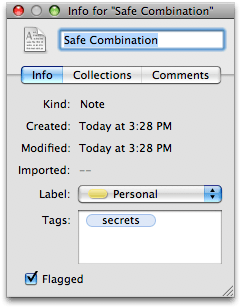
The Inspector window allows you to view and change information about a particular item or group of items. The Inspector contains three tabs: Info, Collections, and Comments. The Inspector window also allows you to view or change the label, tags, flag status, or comments associated with an item (or multiple selected items).
You can add a custom icon to any custom Collection by dragging an image onto the default folder icon in the Inspector window for that Collection.