Yojimbo Product Tour
Tour Start | Using Collections | Using the toolbar | Searching for items | Encrypting Sensitive Data | Using the Inspector window | Exploring tag relationships | Editing Tags & Labels | Input Methods | Sync | iPad | Sidekick | Tour End
Toolbar
Many common commands are just a click away.
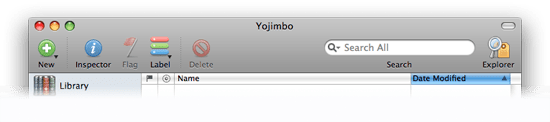
- New
Drop-down menu that allows you to create a new item.
- Inspector
Brings up the Inspector window, which displays and allows you to edit the details about any selected items.
- Flag/Unflag
Sets a flag on any selected Yojimbo items.
- Label
Drop-down menu that allows you to assign a label to any selected items, or to edit your label names and colors.
- Delete
Moves any selected items to Yojimbo’s trash.
- Search
Search the selected Collections for text. Click the magnifying glass to restrict the search to specific locations.
- Tag Explorer
This button toggles the visibility of the Tag Explorer interface.